What Should a School Check Before Buying an Interactive Panel?
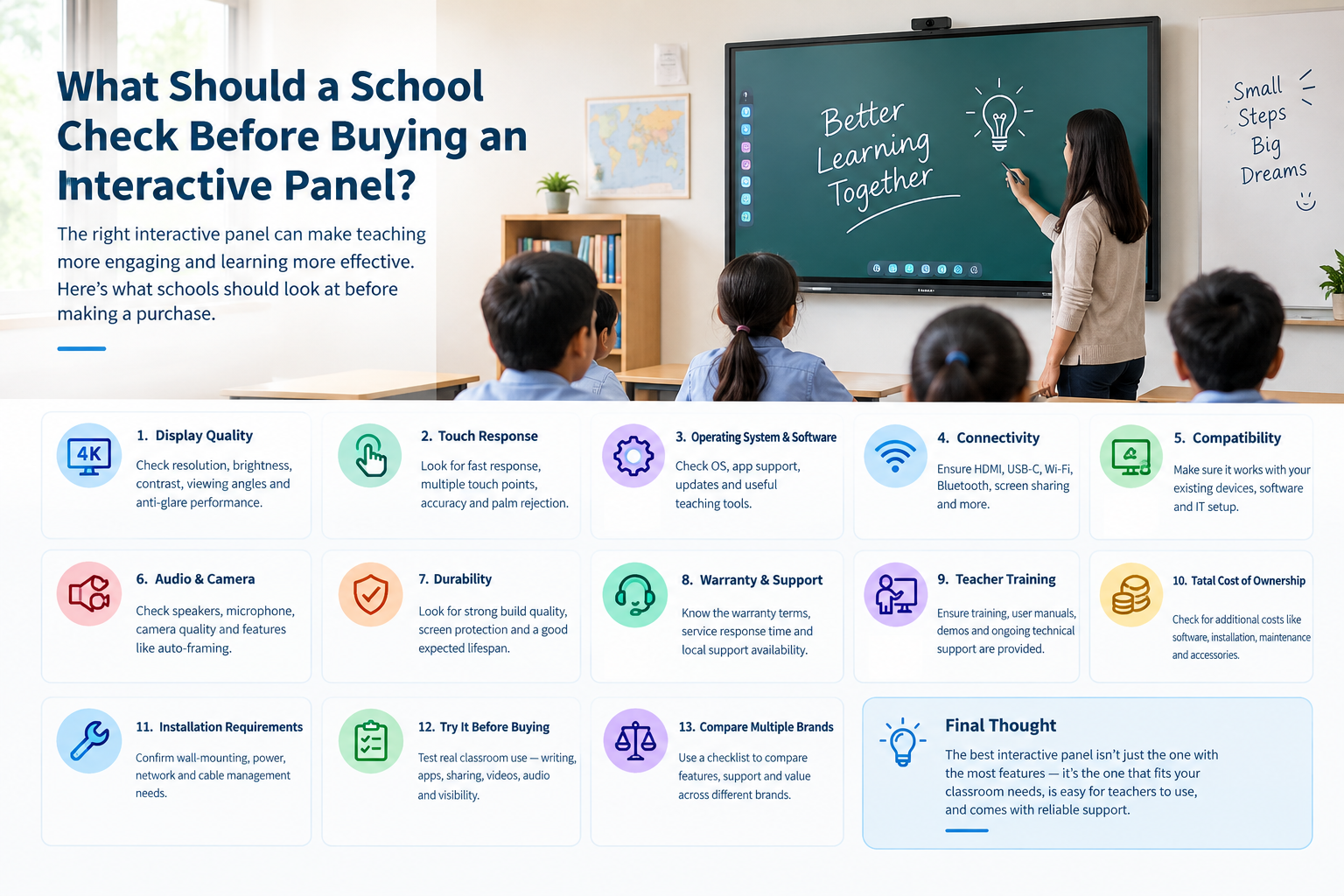
Buying an interactive panel is a long-term investment for a school. The panel will be used by teachers and students every day, so schools should look beyond screen size and price before making a decision.
Here are some important things a school should check before buying an interactive panel.
1. Display Quality
The display should be clear enough for students sitting at the back of the classroom.
Check:
- 4K resolution
- Screen size suitable for the classroom
- Brightness and contrast
- Viewing angles
- Anti-glare performance
- Display visibility under classroom lighting
A panel that looks good in a showroom may perform differently in a brightly lit classroom, so it is useful to see a live demonstration.
2. Touch Response and Accuracy
Touch is one of the main reasons schools choose an interactive panel instead of a conventional display.
Check how quickly the panel responds when writing or drawing. Schools should also check:
- Number of simultaneous touch points
- Writing accuracy
- Palm rejection, if available
- Stylus performance
- Whether multiple students can write at the same time
Teachers should test handwriting and annotation during the demo rather than relying only on the specifications sheet.
3. Operating System and Software
The operating system can affect how teachers use the panel.
Ask the vendor:
- Which operating system does the panel use?
- Is it based on Android?
- Does it support Google services where required?
- Which classroom applications are supported?
- Can teachers install required apps?
- How frequently is the software updated?
- Are software updates included or charged separately?
Schools should also check whether the built-in teaching software is actually useful for their teachers instead of choosing a panel based only on the number of features listed.
4. Connectivity
A classroom panel should work easily with the devices teachers already use.
Check for connectivity options such as:
- HDMI
- USB
- USB-C
- Wi-Fi
- Bluetooth
- Screen sharing
- LAN/Ethernet
If teachers use laptops, tablets or document cameras, check whether those devices can connect without unnecessary additional equipment.
5. Compatibility With Existing Systems
Before purchasing, schools should consider their existing IT setup.
For example, check compatibility with:
- Windows computers
- Laptops
- Google Workspace
- Microsoft Office
- Classroom management software
- Video conferencing applications
- Existing digital teaching content
This can prevent compatibility problems after installation.
6. Audio and Camera
If the panel will be used for online classes or hybrid teaching, audio and camera features become more important.
Check:
- Built-in speakers
- Speaker output
- Microphone quality
- Camera resolution
- Camera field of view
- Auto-framing or tracking features, if required
The school should test these features during an actual video call rather than judging them only from specifications.
7. Durability
An interactive panel in a school classroom may be used for several hours every day.
Ask about:
- Screen protection
- Touch-surface durability
- Build quality
- Expected operating life
- Heat management
- Warranty coverage
Schools should also ask how the panel is expected to perform under regular classroom use.
8. Warranty and After-Sales Support
This is one of the most important points and is sometimes overlooked during the buying process.
Ask the vendor:
- How long is the warranty?
- What exactly does the warranty cover?
- Who handles installation?
- How quickly are service requests normally addressed?
- Is there a local service team?
- Are spare parts available?
- Is onsite support available?
For a school with multiple classrooms, service availability can be just as important as the hardware specifications.
9. Teacher Training
Even a feature-rich interactive panel is not very useful if teachers do not know how to use it.
Check whether the vendor provides:
- Installation training
- Teacher training
- User manuals or tutorials
- Demonstration sessions
- Ongoing technical support
It is also worth asking whether training is available when new teachers join the school.
10. Software Updates and Additional Costs
Schools should understand the total cost of ownership rather than looking only at the initial purchase price.
Ask whether there are additional costs for:
- Teaching software
- Software updates
- Cloud services
- Screen-sharing tools
- Extended warranty
- Installation
- Annual maintenance
- Accessories
A lower initial price does not necessarily mean a lower overall cost if essential software or services require recurring payments.
11. Installation Requirements
Before ordering, check the installation requirements.
The school should confirm:
- Wall-mounting requirements
- Recommended installation height
- Power requirements
- Network requirements
- Cable management
- Availability of compatible stands or mounts
For multiple classrooms, it is useful to standardize the installation process so teachers have a similar setup across rooms.
12. Try It Before Buying
A product demonstration can reveal things that are difficult to understand from a specification sheet.
During the demo, teachers should actually try:
- Writing on the screen
- Opening and switching between applications
- Sharing a laptop screen
- Playing educational videos
- Using the built-in teaching tools
- Connecting external devices
- Testing the speakers and microphone
- Checking visibility from the back of the classroom
If possible, schools should test the panel in an actual classroom rather than only in a showroom.
Final Checklist
Before purchasing an interactive panel, a school should consider display quality, touch performance, operating system, software, connectivity, compatibility, durability, audio/video features, warranty, service support, teacher training and total cost of ownership.
The most important thing is to evaluate the panel based on how it will actually be used in the classroom. A product with many specifications is not necessarily the right choice if it is difficult for teachers to use or if support is not readily available.
A classroom demonstration, feedback from teachers and a clear comparison of total costs can help schools make a more informed purchase decision.
One thing I would add is teacher training. A panel can have many features, but if teachers are not comfortable using them, most of those features may never be used. A hands-on demo before purchase is definitely helpful.